
Mybatis-Plus
MybatisPlus 是基于 Mybatis 框架开发的增强型工具,旨在简化开发、提高效率
快速上手
创建新的Springboot工程 我们需要导入Mysql的坐标,后续手动添加MybatisPlus的坐标
第一步:导坐标
<!-- 注意:Springboot3.* 要使用这个 -->
<dependency>
    <groupId>com.baomidou</groupId>
    <artifactId>mybatis-plus-spring-boot3-starter</artifactId>
    <version>3.5.9</version>
</dependency>
MybatisPlus的jar包中已经包含了Mybatis-Spring和Mybatis的jar包了,不需要再重复导入
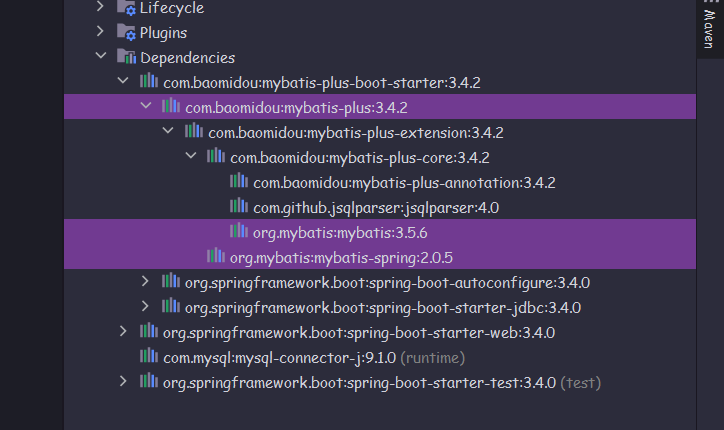
第二步:配置yml,创建实体类
server:
  port: 8080

spring:
  datasource:
    driver-class-name: com.mysql.cj.jdbc.Driver
    url: jdbc:mysql://localhost:3306/ssm_db
    username: root
    password: password
public class User {
    private Long id;
    private String username;
    private String password;
	// setter & getter & toString
}
第三步:编写数据层
和以前一样,创建出 UserMapper 接口,并且添加 @Mapper 注解 但是我们不需要编写内容,只需要将这个接口继承一个叫 BaseMapper 接口 还需要给它一个泛型,泛型的类型就是对应的实体类型,此处也就是 User 类型
@Mapper
public interface UserMapper extends BaseMapper<User> {
}
第四步:在启动类添加MapperScan注解
@SpringBootApplication
@MapperScan("com.angel.mapper")
public class MptestApplication {
    public static void main(String[] args) {
        SpringApplication.run(MptestApplication.class, args);
    }
}
测试
在SpringbootTest单元测试中,当我们调用userMapper类中的方法时,发现已经存在很多操作数据库的方法了
@SpringBootTest
class MptestApplicationTests {

    @Autowired
    UserMapper userMapper;

    @Test
    void mapperTest() {
        User user = userMapper.selectById(1L);
        System.out.println(user);
    }
}
分页查询
首先设置分页拦截器作为Spring管理的bean
@Configuration
public class Mpcongfig {
    @Bean
    public MybatisPlusInterceptor pageInterceptor(){
        MybatisPlusInterceptor interceptor = new MybatisPlusInterceptor();
        interceptor.addInnerInterceptor(new PaginationInnerInterceptor());
        return interceptor;
    }
}
执行分页查询
IPage page = new Page(2,3);
userDao.selectPage(page, null);
System.out.println("当前页码:"+page.getcurrent());
System.out.println("每页数据总量:"+page.getsize());
System.out.println("总页数:"+page.getPages());
System.out.println("数据总量:"+page.getTotal());
System.out.println("当前页数据:"+page.getRecords());
开启日志
mybatis-plus:
 configuration:
  log-impl: org.apache.ibatis.logging.stdout.StdoutImpl